Our 2014 forecast: HOT!

Photo: Justin Ornellas (CC)
Brrr! We are in the middle of a severe cold snap this week. Think warm thoughts … think warm thoughts …
But 2014 is looking hot, red hot. Best to look ahead, because — like the weather — your communication needs will change rapidly, and your preparation begins today.
Some of you will need help mapping out a course. It will start with your most basic needs: new sales leads, better customer service, understanding technology and channels and so on. I can guide you through our needs assessment so that you receive exactly what you need, not what someone’s pushing on you.
Companies may need training in multiple areas: interpersonal dialogue, effective email campaigns, public speaking, how to make the most of your 3 minutes on the air, Twitter or social networking. I can train employees one on one or in groups as large as 100.
The trickiest area can be strategy. You may not know which direction to pick, because each one looks somewhat promising and probably expensive. I will help you sort through tactics to find the ones that meet your resources and your goals.
Don’t face the chilly conditions of communications alone. Before you know it, you’ll be basking in the warm glow of smart marketing and interaction.
•
Part of the 2014 BBA yearlong blogging challenge.
See more posts from the series.
•
See our full list of services.
• • •
It’s never too cold for a free consultation.
Contact me today to set one up …

The 2014 BBA yearlong blogging challenge

Photo: Alexandre Dulaunoy (CC)
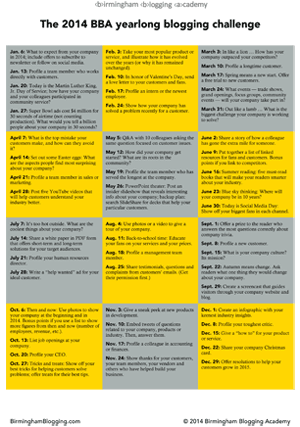 Some of you are caught in a gap.
You have a blog on your company site, but you don’t know how to fill it. You don’t have the time to brainstorm, but you want to put your brand out there in Internet land.
The 2014 BBA yearlong blogging challenge can help you. [Download as a PDF.]
Look to this list of ideas for a new blog post every Monday. Some are short and easy to write. Others will take planning and production.
Creating a new blog post a week will help you …
- Understand your brand better;
- Stretch as a blogger;
- And have fun!
No matter what type of company or products or services or target audience, this list of ideas can help you think more deeply about your customers’ needs and your brand’s hidden identity.
Happy blogging in 2014!
The 2014 BBA yearlong blogging challenge
- Jan. 6: What to expect from your company in 2014; include offers to subscribe to newsletter or follow on social media.
- Jan. 13: Profile a team member who works directly with customers.
- Jan. 20: Today is the Martin Luther King, Jr. Day of Service; how have your company and your colleagues participated in community service?
- Jan. 27: Super Bowl ads cost $4 million for 30 seconds of airtime (not counting production costs). What would you tell a billion people about your company in 30 seconds?
- Feb. 3: Take your most popular product or service, and illustrate how it has evolved over the years (or why it has remained unchanged).
- Feb. 10: In honor of Valentine’s Day, send a love letter to your customers and fans.
- Feb. 17: Profile an intern or the newest employee.
- Feb. 24: Show how your company has solved a problem recently for a customer.
- March 3: In like a lion … How has your company outpaced your competitors?
- March 10: Profile a longtime customer.
- March 17: Spring means a new start. Offer a free trial to new customers.
- March 24: What events — trade shows, grand openings, focus groups, community events — will your company take part in?
- March 31: Out like a lamb … What is the biggest challenge your company is working to solve?
- April 7: What is the top mistake your customers make, and how can they avoid it?
- April 14: Set out some Easter eggs: What are the aspects people find most surprising about your company?
- April 21: Profile a team member in sales or marketing.
- April 28: Post five YouTube videos that will help customers understand your industry better.
- May 5: Q&A with 10 colleagues asking the same question focused on customer issues.
- May 12: How did your company get started? What are its roots in the community?
- May 19: Profile the team member who has served the longest at the company.
- May 26: PowerPoint theater: Post an insider slideshow that reveals interesting info about your company; backup plan: search SlideShare for decks that help your particular customers.
- June 2: Share a story of how a colleague has gone the extra mile for someone.
- June 9: Put together a list of linked resources for fans and customers. Bonus points if you link to competitors.
- June 16: Summer reading: five must-read books that will make your readers smarter about your industry.
- June 23: Blue sky thinking: Where will your company be in 10 years?
- June 30: Today is Social Media Day: Show off your biggest fans in each channel.
- July 7: It’s too hot outside. What are the coolest things about your company?
- July 14: Share a white paper in PDF form that offers short-term and long-term solutions for your target audiences.
- July 21: Profile your human resources director.
- July 28: Write a “help wanted” ad for your ideal customer.
- Aug. 4: Use photos or a video to give a tour of your company.
- Aug. 11: Back-to-school time: Educate your fans on your services and your prices.
- Aug. 18: Profile a management team member.
- Aug. 25: Share testimonials, questions and complaints from customers’ emails. (Get their permission first.)
- Sept. 1: Offer a prize to the reader who answers the most questions correctly about company trivia.
- Sept. 8: Profile a new customer.
- Sept. 15: What is your company culture? Its mission?
- Sept. 22: Autumn means change. Ask readers what one thing they would change about your company.
- Sept. 29: Create a screencast that guides visitors through your company website and blog.
- Oct. 6: Then and now: Use photos to show your company at the beginning and in 2014. Bonus points if you use a list to show more figures from then and now (number of employees, revenue, etc.).
- Oct. 13: List job openings at your company.
- Oct. 20: Profile your CEO.
- Oct. 27: Tricks and treats: Show off your best tricks for helping customers solve problems; offer treats for their best tips.
- Nov. 3: Give a sneak peek at new products in development.
- Nov. 10: Embed tweets of questions related to your company, products or industry. Then, answer them.
- Nov. 17: Profile a colleague in accounting or finances.
- Nov. 24: Show thanks for your customers, your team members, your vendors and others who have helped build your business.
- Dec. 1: Create an infographic with your keenest industry insights.
- Dec. 8: Profile your toughest critic.
- Dec. 15: Give a “how to” for your product or service.
- Dec. 22: Share your company Christmas card.
- Dec. 29: Offer resolutions to help your customers grow in 2015.
• • •
55 ideas for blogging for
the blogger who doesn’t want to blog
• • •
Never get stuck blogging again.
Call me in to help your company’s blog prosper in the new year …
The 2013 index to posts

Photo: Shannon (CC)
I had a great time sharing with you and learning from you in 2013. Take a look at my posts this year, organized by category below.
Blogging
- Blogging for the blogger who doesn’t want to blog
- Hanging out in the virtual peanut gallery
- Have your blogging question answered by top peers
- The worst headlines in history will destroy your faith in humanity
- WordCamp Atlanta 2013 presentation: How to Win Awards, Influence Readers
Social Media
- Better communication through Facebook groups for business
- Building a community on the cheap with Google+
- Case study: 11,000+ Facebook Shares for chickens in sweaters
- Growing an organic following on Twitter in 2013
- How to manage the Twitter fire hose of information and noise
- I wrote a book about our social media community, and it’s free
- LinkedIn for Nonprofits, a free program you’ll love
- LinkedIn, how I have missed you (and misused you)
- Pinterest adds maps to its pins and boards
- Social media and volunteerism: How to change the world
- The bigger Twitter gets, the less I like it
- The squeaky wheels of Facebook
- The writer’s unfair advantage in social media
- Why hashtags still matter
Digital Marketing
- Adventures in community building
- Book it: a scavenger hunt on social media
- Do everything wrong and backwards
- How to run promotional campaigns and build your list using WordPress
- More from WordCamp Atlanta 2013: Video on advanced content management
- Nothing’s more compelling than great storytelling
- Start with your audience
- The digital revolutions
- The go-to guy for media
- The power of digital storytelling, in three parts
- Which video strategy is right for your company?
- Why consistency matters most in successful communication
Leadership and Management
- Focused communication: Working with subordinates, peers and bosses
- Notes from a new conference organizer
- Pay attention: How I’m listening to improve my communication
- Taking on a new role at our nonprofit organization
Last but not Least
- 2014 goal: Improve my storytelling
- How to curate and crowdsource conference coverage
- How to triple your reading
- I will teach you to ________
- Let’s brainstorm
- Meet me at Cantina on Friday
- Speaking gigs: WordCamp Atlanta, March 2013
- Two questions
- Video: Tips for iOS 7 for iPhone and iPad
- What I do for a living
- When compliments go wrong, part 2
- WordCamp Atlanta 2013: a look back
- Y’all Connect blogging/social media conference in 3 weeks
Also: The 2012 index to posts
• • •
Want to keep up with the latest information in 2014?
Be sure to subscribe to my free weekly newsletter.

Hanging out in the virtual peanut gallery

Photo: Michael Coghlan (CC)
Most of us don’t have big comment communities, and likely never will. That’s OK: They can be troublesome to manage and rife with infighting, spam and nastiness.
But, oh, how fun they are when they work.
I look at content for info or entertainment. But I study the comments for genuine laughs and opinions. My favorite comment communities allow users to display their wit and have deeper discussions, while self-policing for trolls and spambots.
For example, Gawker and its sister sites trade in provocative posts. What’s great about looking at a post on io9 or Jezebel is seeing how the regulars will respond.
And fortunately, they can respond with text, GIFs and videos in threaded comments. They can give points to their favorite comments.
I like to think I’m a comedy snob, but really, a clever screen name is enough for me. The responses on this post, “Oklahoma Legislature Opens Door to Satanic Monument on Capitol Grounds,” are fairly typical.
Another place I’ll spend time reading and laughing is the A.V. Club, the Onion’s pop culture site. Specifically, the robust TV Club section.
The A.V. Club recently switched to the Disqus commenting system, which apparently has caused some dissension among the ranks. The current settings don’t allow any embedded media, just up votes and down votes. Disqus allows readers to sort comments by date or by up votes, but I rarely switch it up.
The site not only keeps track of active TV shows, but also classics. I enjoy popping in for the occasional retro-review of “Star Trek: Deep Space Nine,” but what I really love are the capsules from Rappin’ Jake Sisko. Take in the poetry from this recent analysis of DS9 episode, “Inquisition.”
My final example is an old standby, What’s Alan Watching? on HitFix, another TV blog. Critic Alan Sepinwall posts news items and reviews almost daily. I’ve long admired his simple comment policy which keeps life easier for blog writer and blog readers.
I enjoy reading viewers’ reactions to the latest episodes of my favorite shows, so I’ll stop by daily to see what comments pop up. They always see things I miss, or, at the very least, run through my favorite quotes. HitFix recently added the Like button to comments, but no sorting or no embedding allowed.
Check out the discussion below Sepinwall’s latest review of “Brooklyn Nine-Nine.”
Vibrant online communities make good blogs great. Even if the posts are mediocre, the comments keep me coming back. I’m content to read and laugh along, rarely putting in my own 2 cents.
Make it easy for readers to leave comments and interact not only with you but also each other. Give them room to play, and watch how they help your site flourish.
• • •
Learn more about communication in the digital world
with my free weekly newsletter …

2014 goal: Improve my storytelling
Video: Vine compilation 2013
I could tell much better stories. I need to work on that skill as much as possible.
I worked on my focus this year, and will continue to do so in the years to come. In 2014, I want to also work on my storytelling. That might mean in writing and in my daily haiku. That might mean in video. That might mean onstage.
I believe in stories. I love watching them and reading them and hearing them. It’s why Malcolm Gladwell sells so many books, by hooking readers with compelling narratives. It’s why even a 6-second Vine video can have a beginning, middle and end before you can blink. (See a slew of examples in the video above.)
It’s why even a creative nonfiction tweet (#cnftweet) can pack more story into 140 characters than in some novels.
https://twitter.com/amalchik/status/405818351038889986
Improving my storytelling skills will help me teach others more effectively. I weave stories into my presentations and training sessions, but usually in addition to my outline. I need to think more narratively from the start.
Being better at storytelling will also help me assist clients in developing campaigns and messaging for their goals. I already help plan editorial calendars, but having the story defined from the start will guide us in our work.
I shall dig deep into story construction and presentation. I know where I need to work hardest, and I look forward to practicing these skills.
Come see me in 2014, and let me tell you a story …
• • •
I share stories and links to stories in the free
weekly Birmingham Blogging Academy newsletter …
Pinterest adds maps to its pins and boards

Screenshot of the Birmingham Pinterest place board
I wasn’t terribly good at geography in school. Maybe Pinterest’s newest feature will help me.
Last week, the social network added place pins to its “rich pins” set. Pinners can add location data to each pin, creating a “place board” or map of tourist attractions, hotels, restaurants, retailers and more.
If a locale has a Foursquare marker, it can have its location data on Pinterest.
When I found out Thursday, I started building a Birmingham place board with 74 pins. I learned my friend and colleague Jen was building her own map, ShopSmallBHAM. Funny how we both jumped right in on the first day. We’re just a couple of Pinterest nerds.
I can embed the pins on this site, but for now, they look exactly the same as regular pins … no location info included. Clicking on the embedded image leads to the pin, complete with a mini-map.
Gip’s Juke Joint pin with no geolocation data
I can also embed place boards, but as shown below, the embedded boards have no overall map (like the screenshot up top).
Birmingham place board, but no map
ShopSmallBHAM place board, but no map
Despite these display limitations, I can build a data-rich map similar to ones in Google Maps, with the added benefit of a great social network. (Google Maps, however, allows full map embedding, custom locations, routes and more.) Other pinners can follow the place board, repin their faves (to either regular pinboards or place boards), and Like or comment on pins.
(One huge and frankly odd limitation is the omission of follower counts on place boards. A Pinterest customer service representative said via email, “We don’t display followers on place boards — we’re working on a few designs to improve this in the near future.”)
The Pinterest blog rolled out the new feature with a list of 20 select place boards. My two favorites are …
1. A campus tour of the University of Michigan.

•
2. Chef Andrew Zimmern’s favorite barbecue joints across America.

Geolocation data can be a critical component, both for customers and companies.
A smart business will already have its Foursquare locations registered. A smart business will use Pinterest maps and geolocation-rich pins to feature branches, vendors, fans and any locale that relates to its mission.
And a smart business will understand that mapping provides another opportunity to reach and connect with people by giving geographic context to any message.
•
•
Let’s brainstorm

I must confess: I don’t do coffee.
I mean, I do coffees, as in coffee meetups. But I’ll likely have a Diet Coke.
Despite this shortcoming, I’d still like to do coffee with you. Meeting face to face gives me a better sense as to where you may need help with communication.
It will also give you a better sense as to what I do for a living. Because this is what I do, assessing corporate communications and making suggestions on how to improve, based on your goals.
Brainstorming is one of my strengths. I’ll pitch idea after idea after idea. And it won’t cost you a penny — I’ll even spring for the coffee.
(For those of you outside the Birmingham area, we can chat by phone, Skype or other video service. BYOC.)
Let’s do coffee soon. You’ll walk away with some killer ideas.
Photo: Martin Fisch (CC)
• • •
Let me know when you’d like
to brainstorm strategies and tactics …
Focused communication: Working with subordinates, peers and bosses
Slides: “Focused communication: Working with subordinates, peers and bosses”
I’m giving this presentation on “Focused communication: Working with subordinates, peers and bosses” today to a class at Samford University. I’ve spent years honing my skills for effective interaction up, down and sideways.
What can you do to understand your colleagues better and help others work in harmony? I have nine strategies for improving communications with an emphasis on service.
1. You can download these slides or embed them on your site. To download a PDF, click the button marked “slideshare,” then “Save.”
2. If you want to stay in touch …
- You can contact me through this simple form. Please feel free to ask questions, make suggestions or request help.
- You can follow me on Twitter at @WadeOnTweets.
- You can subscribe to the free e-mail newsletter with tips, info, specials and more.
- And you can subscribe to my Birmingham Blogging Academy posts by RSS feed or by e-mail by looking for the box in the right sidebar.
Thanks for checking out “Focused communication: Working with subordinates, peers and bosses.”
• • •
My free weekly newsletter has more ideas
to help improve your communication …
Which video strategy is right for your company?

Photo: CalypsoCrystal (CC)
The right equipment will give you the best audio and video quality, even in the field.
Video can be compelling. It can show off your personality and engage an audience in ways text and photos can’t. It can convey complex information in minutes through great visuals and narration.
And it can be a pain in the ass.
Before you roll cameras on incorporating videos into your digital storytelling, let me give you some direction on what role it should play in your business.
Strategy No. 1: On the cheap
What’s involved: A smartphone, a YouTube account, a tripod (optional).
Pros: A great way to get started quickly, shooting short selfie videos on the fly. Shoot, upload to YouTube, share on social media, done. Costs next to nothing if you already have a phone.
Cons: You have to be willing to show your informal side to the world. The quality of the audio and the video will likely be poor to passable.
Strategy No. 2: Better look and sound
What’s involved: A smartphone or a low-end pocket video camera (preferably with audio input), a YouTube account, a tripod, homemade lighting (“101 DIY Lighting Tutorials”, “DIY Lighting”), microphones, editing software or app.
Pros: Your videos will look and sound more professional than 99 percent of other videos. Ability to set up location shoots (even just down the hall or on another floor) as needed. Less than $500 cost.
Cons: A big time cost in building the lighting gear and learning the software. Storage space required for gear. Editing time increases in piecing together video and audio clips.

Photo: Melonie Galagos (CC)
Dedicated studio space gives you complete control over professional video production.
Strategy No. 3: Going pro
What’s involved: A video camera or two, a YouTube account (or paid video hosting) and a website, tripods, empty office set aside as studio, lighting, microphones, editing software, a set (chairs, demonstration table), backdrop, green screen, stock music, dedicated editing computer and monitors, experienced videographer and on-camera talent.
Pros: More videos can be shot and edited in batches. Faster turnaround time. Full control over lighting and audio. Easy to start shooting quickly on an interview or product demonstration. What previously cost tens of thousands of dollars can be done for thousands of dollars.
Cons: Cost goes up in hiring experienced pros. Much more complexity in the process.
While the cost of video production has decreased dramatically, it still requires significant time and a good eye for telling stories in a compelling fashion.
The right approach can brand your company effectively.
• • •
Need help with video content?
Get in touch for a free consultation …
LinkedIn for Nonprofits, a free program you’ll love
Video: Promo for LinkedIn for Nonprofits
LinkedIn created a program about a year ago to help causes and their leaders called LinkedIn for Nonprofits. I signed up and have been using these features for the past 12 months.
If you serve on the board for a nonprofit, or volunteer in some capacity, I encourage you to check out this feature. LinkedIn asks that you register online for a 60-minute introductory webinar; the next one is 1 p.m. Wednesday. Once you complete it, you’re in.
The most important benefit is an upgrade to your account from free to Talent Finder, which usually costs $99.95 a month. This pro account allows you to contact up to 25 members a month using InMail Messages and conduct targeted searches within the network.
That search capability has allowed me to find volunteers, sponsors and vendors for my group, the Alabama Social Media Association. It has also helped with securing sponsors and vendors for my annual conference, Y’all Connect.
Best of all, this program is free.
Check out LinkedIn for Nonrprofits. Not only can it help you find the right talent for your cause, but also help you understand the power of building your network in this social media channel.
• • •
Discover more resources for better
communication in my free weekly newsletter …
Better communication through Facebook groups for business

Companies often struggle with internal communications. Email can be cumbersome, and paper memos can pile up.
What about a free private solution that your staff already uses?
Facebook groups can help teams, departments, managers and branches share information, photos, videos and documents in real time. Administrators can set them up in minutes, and invite others by Facebook or email. Members can stay informed by visiting the group through desktop and mobile versions, as well as email and app notifications.
(LinkedIn has a similar groups function.)
How to set up a group on Facebook
- Go to Groups on Facebook.
- Click Create Group button at top.
- Fill out the form.
Uses for Facebook groups in your company
- Share info usually sent by memo or email.
- Recognize colleagues for outstanding work.
- Brainstorm.
- Poll colleagues for feedback and suggestions.
- Collaborate on simple text documents.
- Post training videos.
- Quick updates on projects.
- Weekly Q&A with the CEO.
- Back channel for teleconferences and video chats.
- Show galleries of new floor plans, product designs, brochure layouts …
- Coordinate social media channel management.
- Boost morale (since everyone’s sharing funny videos and pics anyway).
- Ask and answer questions on department changes.
- Introduce new employees and interns.
- Share links to industry news.
- Gauge daily performance of a sales team.
- Create a searchable archive of information.
- Tag specific people for questions and assignments.
- Employees’ bulletin board.
- Coordinate team members for events.
Is your organization using Facebook groups for internal communication? Share your experiences in the comments.
• • •
Get your company’s communications on track.
Contact me for a free consultation …
When compliments go wrong, part 2
Video: “When everyone’s super …”
Thinking about praise this week, I remembered how compliments can go wrong with insincere attempts.
I hit upon another pet peeve: too many compliments.
It may seem impossible in our cold, cruel world to have too many compliments. Certainly, we hear many complaints about people and companies and meals and TV shows and songs and on and on.
But I find myself often wearying at an endless stream of praise. They might be compliments to ensure everyone in a group or a team is included. They might be the unsophisticated musings of the masses.
I find myself pickier about who I ask for recommendations. I cast a jaundiced eye at heaps of praise on anything and everything.
And I struggle. I try to make sure my compliments come forth regularly, but that they come from a place of true admiration, rather than a superficial reflex. I want my words to count.
Perhaps, my cynicism gets in the way. Or I need to be less stingy with kind words. But I still wonder what would happen if others were more selective about their compliments. Would they have more impact, more credibility?
Or would the world be a sadder place?
• • •
You’re way too smart and pretty for
my free weekly email newsletter
(but subscribe anyway) …
Why hashtags still matter

They’ve been mocked. They’ve been abused. They’ve been misunderstood.
Why are we still talking about hashtags in 2013?
I’ve been bombarded with hashtags in the silliest of contexts. I’ve seen brands fail at establishing them. I’ve seen peers dump them into Twitter bios and Instagram captions. I’ve seen hashtag jacking and campaigns gone awry.
They’ve spread to Facebook and have been the fabric of Instagram. They sorta work on Pinterest and label posts on Google+.
Can we ignore them? Should we ignore them?
Hashtags used consistently over time help people to find relevant information and to connect with others. This becomes even more important during breaking news events.
Twitter has extended its chronological search, allowing users to dig deeper for data. For example, the Alabama Bloggers monthly meetup uses #alablogmeet: I found tweets for events going back 4 years.
Facebook added hashtags earlier this year. Edgerank Checker found that posts with hashtags from Facebook Pages performed worse than posts without hashtags. Worse.
But even Facebook’s limited implementation of hashtag search can be useful. In checking out #sundayread, I found other Facebook users engaged in sharing their links.
Perhaps the most useful aspect of hashtags is ignoring them entirely. Tweetdeck allows users to mute them in a single column (change the setting at the top to exclude) or in all columns (change the main settings). If a hashtag such as #shutdown is trending, muting it can clean up the main timeline easily.
I enjoy a good hashtag, even though they likely cause more clutter than clarity. (Don’t get me started on Instagram hashtags which work in the app but not via Web.) I enjoy the skill involved in deploying tags correctly and the wit behind many of them. I even enjoy the unintended laughs when others do them awkwardly. #schadenfreude
Hashtags will be around a little while longer. Use them smartly to learn faster and connect better.
•
#savethehashtag or #dumpthehashtag?
Share your thoughts in the comments or on Twitter.
Have your blogging question answered by top peers

Good bloggers strive to be better.
Great bloggers share their knowledge freely.
Meet both at the October Alabama Bloggers lunch.
The free event will run from 11:30 a.m. to 1:30 p.m. Oct. 18 at Avondale Park [map] in Birmingham. Bring your own lunch.
Attendees usually range from beginners (and those thinking about starting a blog) to experts. This will be a great opportunity for everyone to ask questions in a new format.
Each person can bring her question written anonymously on a slip of paper to drop into the submission box. During the lunch discussion, guests will take a turn drawing out a slip to read aloud and answer.
So bring yourself, bring a guest, bring a good lunch. And most important, bring your most challenging blogging problem. Your peers will have plenty of solutions.
Photo: Jason Paris (CC)
•
Please let us know you’re coming …

Video: Tips for iOS 7 for iPhone and iPad
Video: iOS 7 tips for hard-to-find features
Users of iPhone and iPads may be in for a big surprise after upgrading to iOS 7. While Apple’s system software is loaded with new features and shortcuts, not all are easy to find or even guess.
After considerable frustration on my part, I found out how to do get to older features. And I also discovered a few new tricks in the process.
My video shows how to …
- Search your iPhone
- Swipe up for Control Center
- Turn on Limit Ad Tracking
- Night mode in Apple Maps
- Close pages quickly in Safari
- Quitting apps
Take a look, and share your iOS 7 tips and questions in the comments.
• • •
Don’t let technology slow you down.
Get in touch today to team up …
Building a community on the cheap with Google+
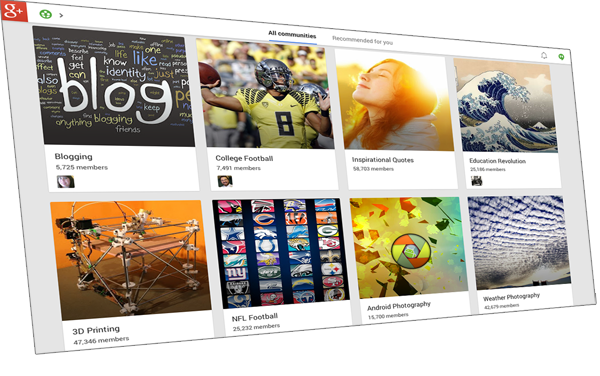
Google+, the social network in waiting, has rolled out features regularly since it debuted in 2011. Its Communities featured came out Dec. 6, and I had the Birmingham G+ Community up and running by Dec. 7.
Some Communities have tens of thousands of members. This Community has more than 300.
I set it up with a simple rule: Play nice or be banned. As the sole admin, I can make rules like that.
The other rule: no spam. A few groups I’ve joined on Facebook and LinkedIn tend to be link dumps and spammy.
(I’ve bent over backwards to follow that second rule. I may put a lot of my links on the Birmingham Pinterest board, but I have not shared any of my posts in the G+ Community in its 9-month existence.)
I had no goal other than to see how the Community feature worked. I haven’t been using G+ much for myself, because it’s challenging to schedule posts, which is my default method for sharing to Twitter, Facebook and LinkedIn.
Like other social networks, G+ Communities can be public or private. They can share links, videos and photos (a nice feature about Facebook Groups is shared documents).
For whatever reason, I never created a Birmingham Facebook Group, just a couple of Interest Lists. And the Pinterest board has done well, but is solely powered by me (co-pinners dropped out over time, and no new volunteers stepped forward).
This Birmingham G+ Community has reached an important milestone: I no longer have to sustain it on my own. Each person has an equal voice in this group, and several have made great contributions.
I like to share current news about my hometown. And I appreciate seeing what others enjoy reading and sharing. It’s interesting to read members’ comments, whether in reaction to a story link or hearing about how they receive (or don’t receive) their news.
Sadly, Google does not provide metrics for its Communities (beyond Ripples for viral posts), nor can users or admins schedule posts. But posts are public for this Community, so even nonmembers can see them (and hopefully embed them someday).
In starting a G+ Community, I have a few quick tips to do it right:
- Don’t make it about a company or brand. It’s my pet peeve, but I’ve seen over and over how trying to elevate the brand over people fails as a tactic.
- Invite people on a regular basis. I invite friends and followers on other networks to check it out and join.
- Post a description and a set of guidelines. This helps participation from the start, as new members know what’s allowed.
- Post new items regularly to start the conversation flowing. No one will post to a seemingly deserted or inactive group. Admins can pull back once others start jumping in.
- Hit the “+1” button a lot, for every good question, post, photo, comment and more.
- Create categories so users can label their posts correctly.
- Police the Community regularly, to weed out trolls and spam. If a user breaks a rule, an admin should message them privately to explain why a post or comment was removed (often, it’s an unintended oversight by a newbie).
- Add a moderator if needed, but define their duties and role clearly.
- And have fun!
Build a Google+ Community to meet people, to learn from them, to debate ideas and to make the world better.
•
Visit our Birmingham + Community and learn more about Birmingham
and the people who make it special.
Start with your audience

Photo: Liz West (CC)
In all your communications, know your audience.
It’s the best starting point in connecting with them. You might be considering one person for an email or a thousand fans for a social media campaign.
Your audience could be friends, customers, partners, strangers or subscribers. They may be experts or beginners, locals or outsiders, peers or unconnected others. Some may be indifferent, or even hostile to your talking points.
 You must understand how they receive news and information: online or through the media or through other people. And what formats they prefer: text, photos, video, graphics, audio and so on.
Not knowing your audience leads to misfires: wrong tone, wrong medium, wrong message, poor results.
Get to know them by asking them questions and studying their behavior. Yes, it sounds like a mad scientist research project, but it ensures you’ll have a message that resonates.
You might assume your audience is just like you, so your preferences should be their preferences. This is a trap. You must get outside your pattern of thinking to see how others react and behave.
But a few of your habits do apply to others: clicking quickly from one thing to the next, skimming for info, making snap judgments on the value of a post or email, being drawn to certain types of headlines or photos.
The only magic bullet in effective communication is to know your audience. Turns out that bullet isn’t a bullet at all, but a process of discovering how groups listen, read and respond.
Photo: James Lee (CC)
• • •
Learn more about better communication through
my free weekly email newsletter …
LinkedIn, how I have missed you (and misused you)

I preach a lot of LinkedIn. In my talks, in my webinars, in my coffees.
And yet, I have strayed far away from LinkedIn, and from my own advice.
Sad.
As I grew busier with my conference over the summer, my routine went out the window. And part of that routine is checking in on my LinkedIn friends. Growing a network is pretty easy, but maintaining it takes regular attention.
That ends today. I’m hopping back on the LinkedIn bandwagon.
I want to take care of three things.
First, I want to update my profile. I advise people to update their profiles twice a year, adding new accomplishments and awards, updating summaries and listing volunteer activities. I’d like to update the welcome video as well, but that will take extra time since I have new clips to incorporate.
Second, I will resume reaching out to my network every day. I have done this off and on for 3 years, and it’s time to pick up where I left off. This is one of the most rewarding social media activities for me.
Third, I need to branch out into LinkedIn Groups. I haven’t paid much attention to the ones I’m in, and I haven’t explored others that might be a better fit. In addition, I may have post-conference discussions using a LinkedIn Group. This is the right time to listen and participate.
Nothing too drastic, just resuming my time spent in an important social network.
After all, I enjoy networking, and LinkedIn helps me stay plugged in to that resource. I can help and connect others there, but not if I’m shunning it.
I hope they’ll accept me back, the prodigal connection.
Photo: greyweed (CC)
•
- How I decide to connect with you on LinkedIn and other social networks.
How to manage the Twitter fire hose of information and noise

Question from a friend on Facebook …
Q: Do you try to keep up with all of the tweets of those you follow? How? Is there a Web app or some way to filter and categorize them? I follow a bunch for development, others for gaming, etc. I cannot keep up, and yet I keep adding more.
A: You might try using Twitter lists, which allows you to group others by category (either publicly or privately). Makes it easier to jump from one interest to the next without a lot of “noise.”
• • •
Have a question about social media?
Just ask.


 Birmingham Blogging Academy