30 Twitter tips hath September: Promote a cause with Twibbon
In September, we’re offering a Twitter tip a day. Send us your thoughts and suggestions.
[Tweet this tip]
Day 29: Twibbon lets your fans show support
with a badge on their avatars.

If you have an event to promote, a cause to share or even just a team to root for, you should consider Twibbon. The free service allows you to add a small logo to your Twitter avatar. For example, many Twitterers who planned on attending Birmingham’s Social South in August added the logo to their avatar (shown above).
You can also support charities such as Susan G. Komen for the Cure or football teams such as the Crimson Tide.
It’s a simple visual way to promote your cause and to get people talking and asking. Plus, when you see friends in your Twitter stream with matching badges, you already have a starting point for conversation.
Follow @WadeOnTweets for more Twitter fun.
30 Twitter tips hath September
30 Twitter tips hath September: Add photos with Twitpic
In September, we’re offering a Twitter tip a day. Send us your thoughts and suggestions.
[Tweet this tip]
Day 28: Show, don’t tell. With Twitpic,
a tweet is worth a thousand words.

Like to shoot photos with your phone? Or have photos on your hard drive the world needs to see. Try Twitpic, which allows easy uploading (via its site or a program such as Tweetdeck) and e-mailing.Then, it helpfully:
- provides a short URL;
- keeps all your photos together under your Twitter account;
- provides HTML to post a photo on your site or blog;
- and even shows how many views each pic has received.
Its integration into Tweetdeck and Power Twitter make it easy to see what photos and screenshots your friends are tweeting. Check out the latest photos from my Twitpic account.
And it costs nothing!
So show your Twitter friends the world around you. Snap a pic and tweet it out with Twitpic!
Follow @WadeOnTweets for more Twitter fun.
30 Twitter tips hath September
30 Twitter tips hath September: Ask for info with Twtpoll
In September, we’re offering a Twitter tip a day. Send us your thoughts and suggestions.
[Tweet this tip]
Day 27: Asking for info is easier
with a special poll like Twtpoll.

Developers have done a great job of coming up with useful Twitter-related apps. One I’ve used (and will use again) is Twtpoll, an easy-to-use polling service.
All you need to do is log in via your Twitter account, then configure your poll as you like. When you tweet out the question and short link, followers can vote on the Twtpoll site. (A nice option allows you to embed the poll question, results or both on your own site, but unfortunately, not on a WordPress.com site like this one.)
It makes it easy to put out quick polls in the field, with short retweetable tweets. And such interesting polling options, from standard multiple choice to ranking/rating photos and Twitterers.
The only caveat: The fewer followers you have, the less data you’ll get (not that this is scientific by any means).
But if you need to take a pulse or grab some quick market research, give Twtpoll a whirl.
Follow @WadeOnTweets for more Twitter fun.
30 Twitter tips hath September
WordCamp Birmingham: Ethical blogging
Slides from today’s presentation WordCamp Birmingham presentation, “Write and Wrong: A Framework for Ethical Blogging.” Thanks for participating, because you made these slides.
Also, check out “Leaders and ‘The Ethics Walk'” from Poynter.
30 Twitter tips hath September: Follow and interact on live events
In September, we’re offering a Twitter tip a day. Send us your thoughts and suggestions.
[Tweet this tip]
Day 26: Keep track of events (like football)
and share real-time info (scores/plays/time).

Click on photo to see the video from Fox 6.
It can be fun to share a live sporting event like a football game with your tweeps.
1. Jump into the conversation.
If it was a bad call, send a tweet. If your quarterback made a terrific play, send a tweet.
2. Keep up with your fellow fans.
One way is to search for hashtags like #rolltide, #wareagle, #goUAB. Here’s an easy setup to monitor all three using Tweetgrid.
3. Share useful info.
Talk about how much time is left, current score, current drive, etc. You’d be surprised how others follow Twitter because they’re some place they can’t watch TV or listen to the radio.
Follow @WadeOnTweets for more Twitter fun.
30 Twitter tips hath September
30 Twitter tips hath September: How would you change Twitter?
In September, we’re offering a Twitter tip a day. Send us your thoughts and suggestions.
[Tweet this tip]
Day 25: What is one thing you would change about Twitter?
Tell us in the comments.
I’ll list a few I’d like to see happen …
- As promised, please make retweeting an official feature and not an informal “RT.”
- It’s a little late for millions, but Twitter finally added an intro guide of sorts. But I’d like to see new users have the option for an online Twitter boot camp to show them how to use the features and get started. (With Facebook, it’s usually pretty easy to get going, but Twitter? Not so much.)
- Block the spammers. Too many are driving away the legit users. It should be easy enough to monitor accounts for “spammy” activities (like @replying hundreds of people in 10 minutes with the same shady link).
What do you want to fix in Twitter? Leave a comment below, please.
(And also, tell us how Twitter has changed your life.)
Follow @WadeOnTweets for more Twitter fun.
30 Twitter tips hath September
Why WordPress is my favorite blogging software
In honor of WordCamp Birmingham, starting Saturday …
I used Blogger when I was at the Birmingham Post-Herald developing a blogging solution for the newspaper. I used Typepad when I was at Southern Living magazine for our corporate blogs. I’ve just recently started using Posterous for a side project.
 They’re all essentially the same.
Except … they’re not.
I was fortunate. When I started my blog Wade on Birmingham in 2005, I had no clue what I was doing. But my friend helped me get started on WordPress (and he knew little about the platform as well).
But as I posted every day, I quickly learned how to maneuver the software quickly. Sure, I had my challenges (wrapping type correctly around images, modifying CSS), but hands down it is still the most professional blog platform out there.
I’ll admit it: I’m a little sad when I see someone set his site up on Blogger. It’s perfectly fine, and millions upon millions of good blogs live on Blogger.
But it’s not for me.
As open source software (anyone can look at it and modify it), WordPress allows for all sorts of great plug-ins and themes (many for free) that make your site better. If I want to add a retail store to my site, it takes one plug-in. Done. If I want to add an audio player to my site, it takes one plug-in. Done.
Don’t get me wrong. It’s not that easy for beginners to add this stuff and make it work. The learning curve can be a little steep, but the community of WordPress users is available to lend a hand.
And it’s free. You can use the hosted version on WordPress.com, meaning you don’t have to pay a dime for renting server space. (This site, Birmingham Blogging Academy, is on WordPress.com) Or you can download the software and host it on your own site. Meaning more control, more customization.
More freedom.
I think you can make a great site or blog on platform out there. But if you asked me to recommend just one, it would always be WordPress. Try it for yourself, and you’ll agree.
I’ll be presenting “Write and Wrong: A Framework for Ethical Blogging” at WordCamp Birmingham.
30 Twitter tips hath September: Ditch the Twitterfeed
In September, we’re offering a Twitter tip a day. Send us your thoughts and suggestions.
[Tweet this tip]
Day 24: Don’t use your Twitter account like
an RSS feed; ditch Twitterfeed.
Twitterfeed connects your Twitter account to an RSS feed (or many feeds), so that each time the feed is updated, it sends out a tweet via your account.
This is a bad idea.
(What’s an RSS feed? Check out “RSS in Plain English” on YouTube.)
Sure, it’s an easy way to promote your blog content (or for some reason, someone else’s blog content), but it’s lazy. It’s robotic. It’s inauthentic.
That doesn’t mean you can’t promote your blog (or anything else you want) via your Twitter feed. I tweet out “selfish tweets” (as I call them) regularly, like for this 30 Twitter tips series. But I write each one. And I try to be selective.
If readers want to subscribe to my RSS feed, the button is conveniently located in the sidebar. It’s optional and automatically updates for you. But if they want to interact with the real me, then they should follow my Twitter account, because I write every single syllable (minus retweets, which I do regularly, though I tend to rewrite many of them).
Remember: Be human. Own up to everything you write, including those short tweets every day.
Follow @WadeOnTweets for more Twitter fun.
30 Twitter tips hath September
Office hours – October 2009
These are some of my favorite meetings of the week. When you stop by, you surprise and challenge me.
I’ll have office hours at coffee shops around town to chat with you and help you with your needs. Yes, I’m giving away 6 hours of consulting time.
This month’s schedule (all Wednesdays from 2 to 4 p.m.):
- Oct. 7: Crestwood Coffee
- Oct. 14: no office hours this week
- Oct. 21: Fifth Avenue Coffee House, downtown [map]
- Oct. 28: O Kafés, Pepper Place, Lakeview
If you want to guarantee an appointment time, sign up on the schedule (in Google Docs). Otherwise, it’s first come, first served.
(And no, I won’t sign you up via e-mail or comments.)
I’m looking forward to seeing you, whether you’re an old friend or a new face. Let’s chat over coffee.
If your coffee shop or restaurant is interested in sponsoring November office hours, please contact me.
30 Twitter tips hath September: More specialized apps for Web
In September, we’re offering a Twitter tip a day. Send us your thoughts and suggestions.
[Tweet this tip]
Day 23: Try Web-based options (CoTweet, HootSuite,
TweetGrid) beyond standard interface.

In the previous tip, I mentioned stand-alone applications that allow you to get the most out of Twitter. In this tip, let’s talk about three Web-based options. (I’ve used one, but have heard strong recommendations for the other two.) The nice thing about these Web-based options is that you can manage your Twitter account from just about anywhere, and if you enlist others to help, they can do it from the comfort of their own browsers.
- CoTweet, shown above, is super-serious customer engagement for business. It allows not only multiple Twitter accounts, but also multiple users to run those accounts. It also allows for scheduling of tweets, and keeps an archive of past tweets and replies. It’s free, but the makers plan to charge at some point.
- HootSuite has similar features as CoTweet, and is free for now as well.
- TweetGrid is a free Web-based Twitter search dashboard, making it easy to monitor up to nine searches in real time. It’s great for keeping up with your brand, your competitors and trending topics. (You’ll find quite a few Twitter search/monitoring tools out there, but TweetGrid has a great interface.)
Which service are you using and why? Tell us in the comments.
Follow @WadeOnTweets for more Twitter fun.
30 Twitter tips hath September
30 Twitter tips hath September: Use specialized applications
In September, we’re offering a Twitter tip a day. Send us your thoughts and suggestions.
[Tweet this tip]
Day 22: Stop using Twitter in your browser,
and start using Tweetdeck or Seesmic Desktop.
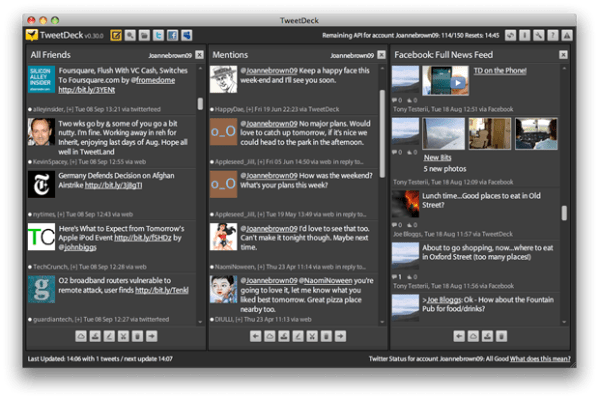
Tweetdeck (shown above) and Seesmic Desktop are two competing free applications that run on your computer to monitor Twitter. Both allow you to monitor multiple Twitter accounts, @replies, Facebook accounts, saved searches and more.
Why would you switch from using the Web interface? Because that view is one-dimensional: You see only a limited amount of data at a time. With either of these tools, you can make sure those talking with you are being heard. You can jump in on conversations, and group your many friends by useful categories.
I’ve been using Tweetdeck almost as long as I’ve been on Twitter (for several months); I haven’t used Seesmic, but have heard great things about it, too from its users. Try them both, and stick with the one you like best. (And if you’re using Tweetdeck, you can learn a lot from this 4-minute video, “How to Tweetdeck Like a Pro,” though some features have changed in the most recent release.)
Which one are you using and why? Tell us in the comments.
Follow @WadeOnTweets for more Twitter fun.
30 Twitter tips hath September
September 2009 media release
FOR IMMEDIATE RELEASE
Sept. 18, 2009
Wade Kwon
mail[at]birminghamblogging.com
BIRMINGHAM’S ONLY BLOGGING CLASS TO TEACH BUSINESSES ON SEPT. 29
My name’s Wade, and I’m a Birmingham native. People wonder why I’ve stuck it out in my hometown, and my answer is always the same: I want to make it better.
One way is by sharing what I know: from business, from experience, from life. So I started teaching.
I imagined someday I would teach high school English and journalism, and I might still do that. But these days, I teach blogging (and sometimes other social media).
Why blogging? Because it’s fun and effective. (It can be even more effective than this release.) It can enhance networking, generate publicity, and yes, bring in new business.
That’s why on Sept. 29, I and my friends are teaching a 6-hour “Beginning Blogging for Business” course at downtown’s Shift Workspace (2308 Second Ave. N.). Companies big and small can get started (or rebooted) in connecting with customers online.
It’s not for everyone. And this material can be learned online, in books and in videos. But as far as I know, we’re the only game in town for in-person instruction.
Students must register online at birminghamblogging.com ahead of time. This class runs from 9 a.m. till 4 p.m.
(I’m speaking at the 2009 BlogWorld and New Media Expo in Las Vegas in October, so I haven’t set any class dates for next month yet.)
For more information on classes, visit birminghamblogging.com.
Wade Kwon is available for interviews on how owners can start blogging the right way to grow their business. Contact him at mail[at]birminghamblogging.com.
– 30 –
30 Twitter tips hath September: Looking? Good. Using Twitter Search.
In September, we’re offering a Twitter tip a day. Send us your thoughts and suggestions.
[Tweet this tip]
Day 21: Use http://search.twitter.com
to find interesting people, data.

The Twitter search tool is one of its most powerful resources. And it’s free. And you don’t even need a Twitter account to use it. Anyone can access this data from any Web browser.
Plus, with each search, you can bookmark it or save it as an RSS feed.
Play around with it, and use it to …
- Find interesting people. Then follow them, or @message them.
- Find interesting events. For example, so many events are popping in Birmingham this fall. Searching for them in real time is easy.
- Find interesting data. What were people saying about last night’s concert or this weekend’s new movie release? Search and see.
Learning to use the search is the first step in harnessing the wealth of info hiding within the Twitterverse.
Below are the standard Twitter search operators. Try them out!
| Operator | Finds tweets… |
|---|---|
| twitter search | containing both “twitter” and “search”. This is the default operator. |
| “Larry Langford” | containing the exact phrase “Larry Langford”. |
| bham OR bhm | containing either “bham” or “bhm” (or both). |
| birmingham –england | containing “birmingham” but not “england”. |
| #haiku | containing the hashtag “haiku”. |
| from:WadeOnTweets | sent from person “WadeOnTweets”. |
| to:bhamterminal | sent to person “bhamterminal”. |
| @Birmingham_News | referencing person “Birmingham_News”. |
| “happy hour” near:“bessemer” | containing the exact phrase “happy hour” and sent near “bessemer”. |
| near:Gardendale within:5mi | sent within 55 miles of “gardendale”. |
| vulcan since:2009-09-20 | containing “vulcan” and sent since date “2009-09-20” (year-month-day). |
| ftw until:2009-09-20 | containing “ftw” and sent up to date “2009-09-20”. |
| movie -scary 🙂 | containing “movie”, but not “scary”, and with a positive attitude. |
| flight 😦 | containing “flight” and with a negative attitude. |
| traffic ? | containing “traffic” and asking a question. |
| hilarious filter:links | containing “hilarious” and linking to URLs. |
| news source:twitterfeed | containing “news” and entered via TwitterFeed |
Follow @WadeOnTweets for more Twitter fun.
30 Twitter tips hath September
30 Twitter tips hath September: Crowdsourcing for dummies
In September, we’re offering a Twitter tip a day. Send us your thoughts and suggestions.
[Tweet this tip]
Day 20: Wanna tap into a great resource?
Ask your followers for help.
You’ve heard the term “crowdsourcing,” but what does it mean?
Of course, you can Google just about anything. You’ll get a zillion results, but it can be hard to tell the good from the junk.
And it can be very hard to get local answers. (As in, recommendations for a dentist or a car wash in your community.)
Crowdsourcing means “outsourcing” your queries to your followers. The more you have, the greater the pool of wisdom in play.
Turn to your Twitter followers. (Before you can, you need to attract a bunch. I’d say at least a hundred to make this effective on a regular basis. Follow interesting people, be interesting yourself, and within a month or two, you’ll have 100-plus followers.) They can answer, and also retweet your question to their followers. Plus, unless your profile is protected, the entire Twitter population can see it in their stream (though it seems unlikely they’d see it, unless it comes up in a keyword search).
I’ve asked for help with car repair, tech issues, presentation topics and more. And I’ve given recommendations on everything under the sun (I’m not shy with my opinions).
What should you ask?
- Ask for recommendations: “Where’s a good Thai place that’s relatively inexpensive for an anniversary dinner in downtown Seattle?”
- Ask for advice: “If you had to interview for a job by phone, what are some good strategies?”
- Ask for opinion: “How’s the new mayor doing on his agenda?”
- Or simply ask, “How is everyone doing?” “Tell me what I need to know today.”
Be sure to thank and retweet the best answers. And, of course, jump in with your own answers to others’ questions. Twitter runs on karma.
Follow @WadeOnTweets for more Twitter fun.
30 Twitter tips hath September
30 Twitter tips hath September: Project your tweets with style
In September, we’re offering a Twitter tip a day. Send us your thoughts and suggestions.
[Tweet this tip]
Day 19: For presentations, Visible Tweets
shows off in style (ex: http://bit.ly/2NrU1o).

Need some pizazz for your conference or panel? Maybe your audience doesn’t want to stare at a blank wall or a Powerpoint slide for 40 minutes.
Let’s see some live tweets. (Fair warning: You never know what your twitterers will say!)
First, make sure your attendees are on the same wavelength with a custom hashtag for the conference (here’s how).
Then, try Visible Tweets, a free service that lets you put in any type of standard Twitter search: hashtags, keywords, usernames. Check out one I set up as an example using the “30 Twitter tips hath September” series, or another one with my recent tweets.
(Hat tip: Ike Pigott, @ikepigott.)
If you need other ways to show live tweeting, try these useful and free tools:
- Twitterfall (see example)
- Twittervision (study the URL to see how to specify a keyword search, like this one for “football“)
- Twittervision 3D (yes, you can zoom in and drag it around)
Follow @WadeOnTweets for more Twitter fun.
30 Twitter tips hath September
September: Get your business blogging
Is it too late for our company to get into social media? No.
Is blogging the right tool for us? Maybe. It depends on your goals.
Can we learn blogging on our own? Absolutely.
But we want to help you skip the beginners’ mistakes, focus on your goals and engage your current and future fans.
Take our new 6-hour blogging course, Beginning Blogging for Business.
Join us on Sept. 29 at Shift Workspace in downtown Birmingham for this fresh approach to blogging. Learn from our combined 16 years’ experience in blogging. Hurry, class space is limited!
Course description
Register today!
30 Twitter tips hath September: How has Twitter changed your life?
In September, we’re offering a Twitter tip a day. Send us your thoughts and suggestions.
[Tweet this tip]
Day 18: Why do you love Twitter? Hate it?
Tell us in the comments.
I read, “Why I Love Twitter,” a post on John Garrett’s (@garrett98) blog that explains why he loves microblogging. For him, it’s about connecting. As a born networker, he uses Twitter as a natural extension of that ability. Meet strangers, start conversations, talk business or hockey. Even introverts like me find it easier to chat it up online than face to face.
I love Twitter’s data. I’m an info nerd, so being able to comb through real-time data (which we’ll talk about soon) is fascinating and potentially valuable. Even just simple questions about what people watch on television or how something works yield great answers.
I hate trying to express complex thoughts in Twitter (which is fortunate, since I have so few). Dialogue is great, but for me often unfulfilling when executed in short replies. It’s why I typically stay out of organized chats. And why I do love blogging.
And it has changed my life. It helps me embrace a culture about sharing, rather than just taking. And for being more visible (which is tough for a private person like me).
So why do you love Twitter? Why do you hate it? Has it changed your life? Now’s your chance to sound off (without a 140-character limit).
Follow @WadeOnTweets for more Twitter fun.
30 Twitter tips hath September
30 Twitter tips hath September: Display your tweets on your blog
In September, we’re offering a Twitter tip a day. Send us your thoughts and suggestions.
[Tweet this tip]
Day 17: Install a Twitter badge on your blog
so your non-tweeting readers can keep up.
 Not all of your blog readers are on Twitter, and many never will be (horror!). But they can still your short bursts of wisdom if you’ll install a Twitter badge on your site’s sidebar.
Blogger: Follow the instructions on the official Twitter badge maker.
Typepad: Follow the instructions on the official Twitter badge maker.
WordPress: You have many widget/plugin options. The one I use for Wade on Birmingham is Twitter Tools. But you have hundreds more from which to choose.
Any site: If you’re feeling particularly saucy, you can try Twitter’s widget generator, which lets you pick the account, the colors and the size, then gives you the HTML code to copy and paste into your template. See the example at right. And check out how quickly our pal Josh (@joshgrenon) added it to his blog, Positive Programmer.
Advanced: If you know your way around CSS and coding, take a look at some truly outstanding ways to show off your tweets on your site.
Follow @WadeOnTweets for more Twitter fun.
30 Twitter tips hath September
30 Twitter tips hath September: Turn your background into a live portfolio
In September, we’re offering a Twitter tip a day. Send us your thoughts and suggestions.
[Tweet this tip]
Day 16: Show off your Flickr photos on
your Twitter profile page with http://t.wist.it.

Whether you’re an amateur or a pro shooter, you can show off your photography on your Twitter background. T.wist.it connects your Flickr and Twitter accounts to put your most recent Flickr pics along the left side of your Twitter background automatically.
For example, check out Provenio’s photo stream on Flickr, and then on its Twitter page. Or my pal Melinda on Flickr, then Twitter.

Follow @WadeOnTweets for more Twitter fun.
30 Twitter tips hath September
30 Twitter tips hath September: The art of the retweet
In September, we’re offering a Twitter tip a day. Send us your thoughts and suggestions.
[Tweet this tip]
Day 15: The art of the retweet: Do it often,
give credit and use proper syntax.
You may skip this one if it seems too rudimentary, but I often see new businesses and individuals get tripped up with retweets.
And I forget that the Twitter Web interface makes it harder than need be.
- Do it often. Retweet what your friends are putting out there. If they’re not putting out good stuff, get new friends. (And no, I’m not kidding.)
- Give credit to the source. It may have been retweeted a few times before you saw it, so I leave it to your discretion as to how many to include. But, and this is important, you must have spaces (or punctuation) around the @name. This ensures that the original twitterer will see it as an @mention in her stream. Note the difference: yes to “RT @WadeOnTweets This is a great article on …” but no to “RT @WadeOnTweetsThis is a great article on …” That one missing space makes a huge difference.
- Use proper syntax. You will see “RT,” “R/T,” “retweet,” “via” and even “HT” or “H/T” or “hat tip.” I suggest “RT” if it’s a direct quote and “via” if you change it a little or tighten it up (which I often do). And if you change it completely, use “hat tip” because I don’t think most are familiar with “HT.”
Bonus tip: Please check the link before retweeting. Even better, check the info. If you mindlessly retweet junk, you are helping no one. Be a discerning twitterer, even if you have to spend an extra 15 seconds clicking through the link.
So how do you actually retweet on the Web interface? Copy the tweet, paste it in the box, type “RT @” and copy/paste the twitterer’s name. Feel free to clean up the tweet (especially if it’s over 140 characters or has previous twitterers scattered all over the tweet.
Or better yet, use the Power Twitter plug-in, which helpfully includes a RT button. (We’ll suggest other programs in a future tip.)
Questions or suggestions? Fire away in the comments.
Follow @WadeOnTweets for more Twitter fun.
30 Twitter tips hath September


 Birmingham Blogging Academy