Video: Common blogger mistakes on Gab With the Gurus
At BlogWorld in October, I had a chance to talk with Connie Bennett, who does a great video series called Gab With the Gurus on YouTube. Connie is an author, blogger, speaker and life coach. You can find out more on her Gab Wtih the Gurus blog.
In this 2-minute video, she and I discuss the common mistakes bloggers make. If you have questions or more suggestions, please leave a comment.
• • •
Want to learn more? Check out our class on
“Beginning Blogging for Business.”
Interesting case study: Terrence Cody Jr. Facebook fan page
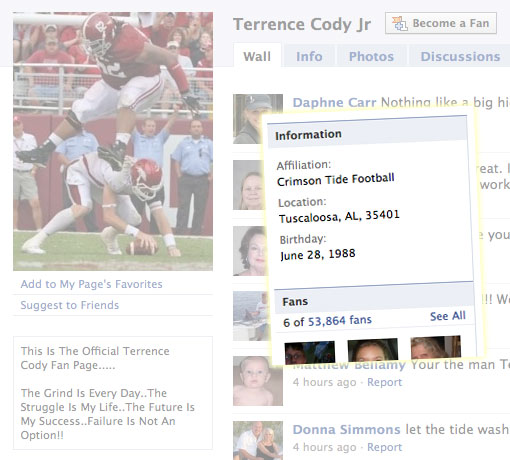
How do you rack up 50,000 fans quickly on Facebook?
If you’re from Alabama, it doesn’t hurt to be a football legend in the making.
Enter Terrence Cody Jr., a senior defensive tackle with the Alabama Crimson Tide. He stands out for a few reasons …
- He’s 6-foot-5 and weighs 365 pounds, earning him the nickname “Mount Cody.” His size alone makes him easy to spot on the field or even on television.
- Cody is a star player on a nationally ranked team. Cody gets good playing time, and therefore, good camera time.
- He makes big plays. His legend was cemented in October during the Tennessee game two weeks ago with not one but two blocked field goal attempts. The second came within the final seconds, saving the game, Alabama’s unbeaten streak and shot at a national championship.
I wish I had a chart showing the growth of the page. I do know it shot up to about 40,000 fans after the Tennessee game, and has been growing steadily since.
Compare that with Coach Nick Saban’s fan page, with a mere 16,000 fans.
Given that it’s likely fans, and not Cody himself, who set up the page, what if anything should be done with it? Keep it pure for the fans? Monetize it with unauthorized Mount Cody T-shirts? Let it grow with Cody (so to speak) as he progresses to the NFL?
Whatever happens, it shows that sometimes Fan Pages attract big numbers for one reason: simple popularity. Mount Cody, truly the Big Man on Campus and even the Bigger Man on Facebook.
Thanks to consistent blogging and good content, I’ve seen my work mentioned on several media sites during the last couple of weeks. The result: more credibility as an expert and a blogger, free publicity and eventually, more clients.
• • •
The Samford Crimson, the student paper for Samford University in Birmingham, wrote about the former mayor’s federal trial in October. I covered the trial on Wade on Birmingham. From the Oct. 28 article:
Twitter has become a primary news source on the trial after Judge Scott Coogler allowed reporters to carry cell phones. The judge is allowing reporters to access the Internet on their phones and to tweet minute-to-minute updates on the trail as it proceeds.
Among the tweeters are Birmingham Weekly, The Birmingham News and citizen journalist and blogger Wade Kwon.
“Mostly we will be testing our new tools and toys like Coveritlive, Qik, Tweetie2 and iPhone,” the Birmingham Weekly staff said in a report on Oct. 18. “We’re going to cover this story 140 characters at a time. When opening statements begin, hang on to your butts.”
The Birmingham News designated a Twitter feed, @Langford_trial, to cover highlights of the prosecution and defense. In addition, Kwon created an automated feed, @LLtrial, with regurgitated media tweets from the trial.
I explained how to set up that automated feed in a post on the BBA site.
• • •
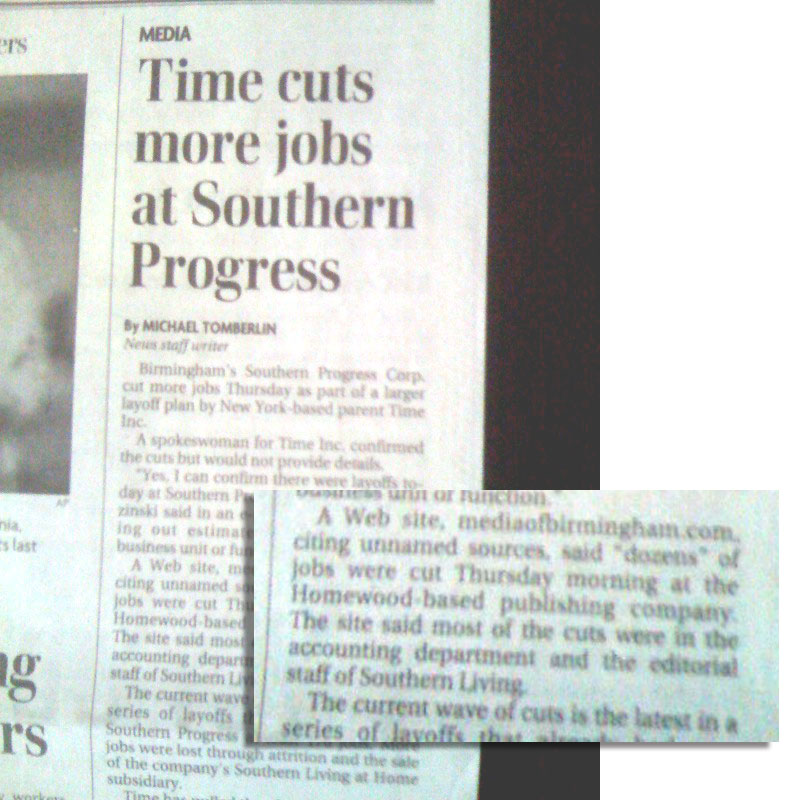
I also write about media news in the Birmingham market on Media of Birmingham. One story attracted quite a bit of attention from our audience, about layoffs at magazine publisher Southern Progress, part of the Time Inc. corporation.
The Birmingham News cited the story in its Nov. 5 story:
The mediaofbirmingham.com Web site, quoting unnamed sources, says “dozens” of jobs were cut this morning at the Homewood-based publishing company. The site said most of the cuts were in the accounting department and the editorial staff of Southern Living.
The New York Post also cited the story on Nov. 6:
Yesterday the Web site mediaofbirmingham.com reported that there were “dozens” of axings in the Birmingham, Ala., offices of Southern Progress, primarily at flagship Southern Living.
• • •
By writing about a high-profile trial, I was noticed for taking a different approach, using a Twitterbot to aggregate all the media coverage into one easy solution.
By writing about Southern Progress’ ups and downs, I built credibility and became the source for media news in the Birmingham market.
It took time and good content, but eventually, even the big media outlets take notice.
Want to learn more? Check out our class on
“Beginning Blogging for Business.”
Fire your Web designer: 5 reasons why

Let’s face it: Your Web page sucks.
I’m pretty sure most of you are nodding your heads in agreement. Somewhere along the line, you or your company needed a site. Or thought you did.
Instead, you got a crappy Web site.
The time has come: Fire your Web designer.
As a professional, he should’ve assessed your needs, not sold you a one-size-fits-all barely customized site. He should’ve handed off the work to someone else if he couldn’t do what you needed: e-commerce, easy updates, better navigation, better SEO.
What are some signs you need to fire your Web designer?
1. You’ve needed to update information any time in the last 2 weeks. And you can’t. Let’s face it: Office hours change. Staff members come and go. Simple fixes and potentially profitable widgets aren’t being made because you’re locked out of your own site.
Would you let someone else control your ability to get into your own building? No way.
2. Your Web person is never available. If you hired someone to not only design the site, but also perform routine maintenance, why isn’t he returning your calls and e-mails? Is he too busy screwing up someone else’s site?
Maybe you don’t need to become the Web guru, because you need to spend your time with other more important business activities. So if your Web person isn’t doing it, then it’s not getting done. Unacceptable.
3. You know you need specific features. The tools in the digital age are always evolving. A year ago, you might not even have heard of Twitter. Now, it might be important to get your brand’s tweets and “Follow Me” badge on the front page of your site. Or you need a better spam comment filter on your blog. Or an integrated Google Maps feature that allows customers to find the locations nearest to them.
Or even a simpler interface so your marketing staff can add new information about upcoming sales and product launches. But your site is stuck in 2006. Oh well, your competitors will be happy to pick up the slack.
4. Your Web designer doesn’t have the skills. Would you ever let a surgeon work on your kidneys if her specialty was feet? So why would you let someone without the proper skills tinker with one of your most visible business assets? Not every Web designer can do everything. But you can find the right one who can do the things you need him to do.
5. Your Web designer doesn’t have the creativity. He should be proactive, not reactive. It’s fine for you to have a well-defined plan for your online presence. But your Web designer should be able to suggest ideas and tools that fit your business best. Or show you the things you don’t need, as buzzworthy as they may be. But if all he does is build what you say, no questions asked, he may not be helping you where you most need it: developing a Web site that grows your business around the clock.
Set your problematic Web designer free. And this time, shop around for one who comes with good recommendations, a good portfolio and a good attitude.
Let’s hear from you: What are some warning signs it’s time to fire your Web designer? And how can you find the right one?
Students’ testimonials: Writing Killer Blog Posts in November
Here’s what our students had to say about our Tuesday class, Writing Killer Blog Posts …

“Kudos to @WadeOnTweets and B’ham Blogging Academy for an informative, helpful class on blog writing. Now to put to use what I learned!”
— Nov. 3 [link to tweet]
Richard Kirby, writer and winner of our Twitter contest
ARKirby.com
@arkirby66
• • •
From their evaluation forms:
“Great class! I learned a lot. Also, the class solidified some aspects I already know, which makes me feel more confident when blogging.”
M.
Researcher
• • •
“I really enjoyed the class and got some helpful info to help me facilitate the blog.”
T.
Advertising agency associate
• • •
“Very effective use of time.”
J.
Advertising agency owner
• • •
Don’t wait … sign up for classes today!
Birmingham protestors take to Facebook for fallen mayor
Birmingham mayor Larry Langford was convicted in federal court last week for bribery, but the story doesn’t end there.
With his conviction, several activists sprang into action on Facebook, with one “Free Larry Langford” group racking up 3,600 members. Can Facebook help his cause, lead to an overturn on appeal or a commutation of his sentence?
(I wrote about it on my other site, Wade on Birmingham, but wanted to also mention it on this blog.)
Certainly, thousands of supporters on Facebook is a stronger showing than the 55 or so attendees at a prayer vigil the night before his trial started.
Does it mean much if three groups and one fan page have the same mission, but aren’t even merged into one big group? Or does it show more widespread support?
And can Facebook save a guilty man?
No office hours till 2010
It was a tough decision, but I’m going to skip office hours through the end of the year. I really enjoy meeting with people on a weekly basis, but I need to buckle down to do some serious writing and organization.
Naturally, I’ll still be meeting with people for the next nine weeks. All you need to do is contact me to set something up. I’ll likely bunch all my meetings on Fridays to limit wasted driving time.
Look for the return of office hours in January. I’ll post a signup sheet again toward the end of December.
Happy blogging!
Bouncing back from a layoff: More advice for job seekers

I talked (online and offline) earlier this week with professionals in Birmingham worried about their jobs. I discussed some strategies before in “Five ways to jump-start your job search with social networking.”
But as a veteran of two layoffs, I have more sage advice:
1. If finances allow, take a month off to recover. We tend to do this anyway nesting, resting, hiding or going to a zillion coffees and lunches. Losing a job can put you through the emotional wringer.
2. Apply for unemployment benefits. I’ve heard some people talk about guilt or shame. Nonsense: We pay into the system. It’s not a handout, it’s an insurance plan for this situation. If $5,000 to $10,000 is just sitting on a table, do you leave it there? That money could tide you and your family over till paying work comes along. It could even finance your next venture.
3. If the company offers free career counseling through a vendor, take advantage of it. Working with a professional counselor can help you with the basics (interviewing, resumes) and the big picture (career options, entrepreneurial ventures, networking). You’ll get a lot of good and bad advice, but why not take free good advice from an expert?
4. Network with others, within and outside of your company, industry or field. Don’t limit yourself to people within your industry — you need to be out there. With business cards.
5. Take comfort in the knowledge that smart, talented people will always find rewarding work. This I truly believe.
What would you tell someone who’s facing a layoff and job hunt? Tell us in the comments.
Photo by timmenzies / CC BY-SA 2.0
Want to learn more? Check out our class on
“Finding Your Dream Job Using Social Networking” …
Winner to attend Writing Killer Blog Posts


Congratulations to Richard Kirby (@arkirby66) of Birmingham, Ala., winner of a free pass worth $149 to Tuesday’s class, Writing Killer Blog Posts. His entry was randomly selected among the 31 entries in our Twitter contest.
Thank you to everyone who entered!
A special thanks to Bethany Richardson at Birmingham Works magazine (@birminghamworks); since she sent the very first tweet about the class, she has also won a free pass.
Don’t worry: You can still register for Writing Killer Blog Posts, a 90-minute workshop to improve your writing and blogging. But don’t wait, because you must register by 5 p.m. Friday.
The twitterbot experiment, or how to get 128 followers in 6 days

The story: On Wade on Birmingham, I write about issues affecting the city and state. Mayor Larry Langford went on trial Oct. 19 in Tuscaloosa, and several media outlets planned to live-tweet from the federal courthouse.
The challenge: Develop an easy way to follow all of those tweets at once. Not everyone is on Twitter, so ganging them together into one stream could be a time-saver.
The solution: A twitterbot, an automated Twitter profile that would retweet these outlets automatically. I chose @LLtrial, instead of something like @LangfordTweets, so the keyword “Langford” wouldn’t continue to dilute the #langford hashtag search.
The method:
1. Select the sources. I chose @1055WERC, @BhamWeekly, @CBS42, @JohnArchibald, @Langford_trial, @LangfordCourt and @LangfordTrial.
2. Build the bot. I followed the steps in “How to make a Twitter bot with no coding” carefully. It took several tries to get it right, especially when using the terrific Yahoo! Pipes service (in which I have some experience) and Twitterfeed (zero experience).
Especially frustrating was the fact that Twitterfeed had a severe service outage during the testing phase, making it impossible to move forward. The first three days of the trial passed before this bot was running.
(By the way, I haven’t forgotten my original advice to “Ditch the Twitterfeed” in the 30 Twitter tips hath September series. I made it clear in the set-up that this was strictly an automated feed. I also made sure that it retweeted with full credit to the original media Twitterer.)
3. Do minimal promotion. Once I knew it worked correctly 99 percent of the time, I tweeted about it once a day early in the morning. The other self-fulfilling promotion was the proper use of hashtags. When the bot retweeted any update with “#langford,” it would show up in everyone’s hashtag search and hopefully pique their curiosity.
FYI: I set Twitterfeed to send five updates every 30 minutes (the maximum). So while it wasn’t a live feed, it kept the number of tweets manageable for followers.
I also included a promo for the bot in my daily recap blog posts about the trial.
The results: In six days, the bot gained 128 followers.
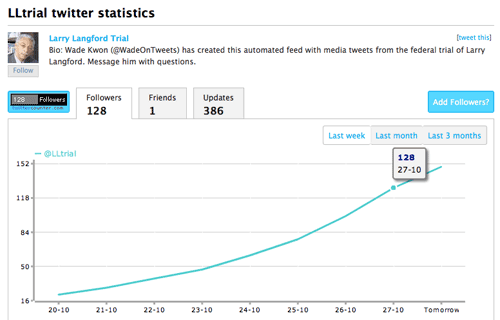
I also had the profile page link back to my site, and left contact info in the bio.
I learned how to build a bot and could do it much more quickly in the future.
Possible applications: Clearly, a bot can be a great way for people to follow a specific subject or hashtag without running searches. You could set up a bot around an event, like this trial or a conference. Or you could set it up to follow and retweet based on specific topic keywords or brand names, such as “health care reform” or “Allstate.”
Tip: It’s all in how you set up the Twitter search and RSS feed. Pick the right words and location, and you’ll create a very valuable bot.
I’ve seen some pretty obnoxious bots that are triggered when you hit the right keyword. (Just try tweeting “Spanish inquisition” and see what happens.) But maybe, just maybe, you could come up with a clever bot that engaged Twitterers mentioning your trigger words in a fun or meaningful way. Just a thought.
And beyond bots, you could also use it to enhance your Twitter feed, but I would be very careful. I’d use it sparingly, making it clear which ones came from Twitterfeed and which ones from you. But just spitting out your RSS feed into your tweets? I’d pass.
• • •
What are some ways you could use a bot to do research? Or extend your brand? Or annoy other Twitterers? Comments, please.
October 2009 media release
FOR IMMEDIATE RELEASE
Oct. 27, 2009
Wade Kwon
mail[at]birminghamblogging.com
NEARLY 20 HOURS OF CLASSES SCHEDULED AT
BIRMINGHAM BLOGGING ACADEMY
BIRMINGHAM, Ala. — The next round of classes have been scheduled at the Birmingham Blogging Academy, including a new advanced class. They will all take place at Shift Workspace (2308 Second Ave. N.) as part of the Shift Learning series.
• Our Beginning Blogging for Businesses class will be coming up twice: Nov. 18 and Jan. 14. Companies big and small can learn how to get started in building online relationships with their blog. 9 a.m. to 4 p.m.
• Writing Killer Blog Posts takes place Nov. 3. This 90-minute course shows how to make your writing and blogging stand out. We’re also holding a Twitter contest to give away one seat in the class. 11:30 a.m. to 1 p.m.
• The Dec. 2 class is for job seekers. Finding Your Dream Job Using Social Networking can show how to take networking to the next level in this competitive market in just 90 minutes. 1:30 to 3 p.m.
• Also on Dec. 2, Using Twitter for Dynamic Market Research will help your business unlock the power of this social network with real-time research. 11:30 a.m. to 1 p.m.
• And in January, we’ll introduce our first advanced class, How to Reach Your Traffic Goals with Search Engine Optimization (SEO). This three-hour, hands-on course will help you meet your traffic goals for your Web site. 9 a.m. to noon, Jan. 30.
The Birmingham Blogging Academy, founded in March, teaches business classes in effective communication using social media.
For more information on classes, visit birminghamblogging.com.
Wade Kwon is available for interviews on any of the courses listed above. Contact him at mail[at]birminghamblogging.com.
– 30 –
Classes through January 2010
The next round of classes have been scheduled, including a new advanced class. They will all take place at Shift Workspace as part of the Shift Learning series.
- Our Beginning Blogging for Businesses class will be coming up twice: Nov. 18 and Jan. 14. Make your 2010 resolution early: Get your company into blogging to build your business relationships.
- Hurry! You still have a couple of days to sign up for Writing Killer Blog Posts on Nov. 3. If you really want your writing and blogging to stand out, this 90-minute course will show you the way.
- (Did we mention someone will go to that class for free? Check out the contest details …)
- For those in a “career makeover,” we have two suggestions. First, learn new skills at the daylong Workforce Survivor, a free set of training sessions for job seekers on Wednesday at the University of Alabama at Birmingham. Second, check out our Dec. 2 class, Finding Your Dream Job Using Social Networking. Take your networking to the next level in this ultra-competitive market.
- Twitter Twitter Twitter. It’s all anyone talks about. You can unlock the power of this social network with real-time research. Give us 90 minutes, and we’ll show you how in Using Twitter for Dynamic Market Research on Dec. 2.
And our instructor Jen Barnett is putting together a terrific three-hour advanced course for January called How to Reach Your Traffic Goals with Search Engine Optimization (SEO). You bring your traffic goals, and she’ll show you how to get there. It’s the class people have been asking for, and we’re happy to deliver.
See all of our classes to learn more. And read why our students love learning with us.
Happy blogging!
How small businesses are turning to blogging

Our friend Cindy at the Birmingham Business Journal did an excellent story on how small businesses can get started in blogging. To what end? Share information, develop a reputation, develop relationships and ultimately bring in new business.
The story, “Now entering the blogosphere,” talks with area experts John Garrett of the Microfit Group, Scott Schablow of Provenance Digital Media, our own André Natta of Urban Conversations and our own Wade Kwon (that’s me!).
In the full article, you’ll see how John turned blogging into new business, and my best practices.
You’ll find a snippet online but for the full story, please run (don’t walk) to your nearest newsstand for the Oct. 23 issue of the Business Journal. It’s only $2.
Summary: When I realized I was giving the wrong presentation, I started to panic. What should I do? Plus, five tips on how you can survive a speaking disaster.
• • •
I delivered my BlogWorld presentation, “Instant Startup: Your Very Own School for Blogging,” from the floor, not from behind the podium. I like getting closer to the audience, rather than being trapped onstage.
When the first few attendees left my presentation early, I wasn’t fazed. “Seminar shopping” is a part of conferences.
Then, a few more left. Did my slides suck? Had I forgotten to shower??
About 15 minutes in, I was hitting my groove, making eye contact, delivering my talk at a relaxed pace. And then someone raised her hand to ask a question.
Jill Stanek (@jillstanek) asked if I would be teaching about how to write better blog posts. I said, “No, maybe you have the wrong room?” (Sometimes, attendees wander into the wrong room.)
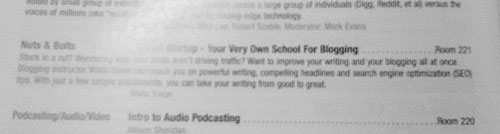
No, she was in the right room, here to see Wade Kwon talk about improving your blog writing. I was confused. Another attendee pulled out her printed guide (I hadn’t thumbed through it yet) and read the description for my session. The session title was right, but the conference organizers had included a summary from a different proposal I had submitted months ago. (See, print isn’t dead.)
I was horrified. I had been giving the wrong presentation!
I started to panic. I wasn’t sure what to do. I was embarrassed for me. I was concerned for those who had already left. I was a little ticked. And I needed a game plan.
I took a deep breath.
“Who here wants to learn about starting your own social media academy?” About five hands went up.
“Who here wants to learn about writing killer blog posts?” Just about everyone else, about 35 people, raised their hands.
I decided. I promised the five people that if they would see me afterward, I would tell them anything and everything they wanted to know about creating your own blogging school. If I had to stand in the hallway and talk with each one individually, I would do it. They paid good money to be at this conference, and I didn’t want to let them down. (One of them was Kim, who told me at breakfast that she was looking forward to my class.)
(And dammit, I spent a lot of time on this new presentation. I’d give it, even I had to stand on the Strip shouting it to tourists.)
And then I told everyone that I would switch to my “Writing Killer Blog Posts” slides. I had 40 minutes left to do a 90-minute presentation with no notes, no preparation (I hadn’t taught this lesson plan in months), but plenty of adrenaline. I warned them that I would be moving quickly, but would still take questions.
I kept a close eye on the clock, as usual. I settled down and started talking through the material. I asked questions, fielded questions, asked more questions. And somehow, we made it through all the material in half the time.
It could’ve been a disaster. It turned out OK, maybe even a little successful. One attendee came up afterward and called me a “rock star.” Wow. She said she appreciated my flexibility and cool under fire.
I do have my concerns:
- Damage to my credibility, especially among those who left and never got the class they wanted.
- Damage to BlogWorld’s credibility. One small editing error makes for a lot of chaos.
- Lessening my chances for speaking at BlogWorld again, either through negative feedback on the attendees’ evaluation forms, or from simply going public with this. (I left a message at the BlogWorld office for organizer Rick Calvert to call me. He hasn’t yet, though it is in the middle of his conference.)
- And simply this: Leaving students in the lurch. I think most got what they wanted. And I did teach the new material to two attendees around the lunch table. It was relaxed, informal and direct.
But I survived. And perhaps gained some confidence. Maybe I can handle any disaster while giving a talk.
• • •
Let me share some tips on how you can survive your own speaking disaster:
Take a deep breath. You have to regain control, of yourself, of the situation. (Though you never really lost control or maybe even had control.)
Listen carefully. Had I not taken Jill’s question, I would’ve continued to make an ass of myself. But Jill had the common sense and courage to ask the obvious question. I’m grateful to her, because she alone saved my presentation. Thank you, Jill!
Listen to your audience carefully. Their verbal and nonverbal signals are the early warning signs if your presentation is going awry.
Prepare for possible hurdles. If the wi-fi goes out, have screenshots of Web sites. If the projector explodes, beat out the fire with a misprinted program, then continue the talk with your notes.
Be flexible. Consider your options (and yes, you always have options). Just think them through. You can’t prepare for every possible snafu, but you’re smart: Can you switch gears? Can you ask the audience for their preference? Can you promise on a make-good and then deliver?
Let’s say I didn’t have the slides or the notes for “Writing Killer Blog Posts,” then what? I could still talk about the two parts of the lesson — improving writing and tweaking the blogging side — in an open discussion. I could throw out some examples, then ask students to suggest their own techniques. I could have students ask specific questions and put their blogs onscreen to critique.
You always have options. Except one: to abandon your audience.
Keep a positive attitude. It’s your show. Even if you’re panicking on the inside, keep a calm exterior. Act calm, and eventually you will be calm. Mistakes happen, and audiences understand that. So be a good sport about it.
Share your suggestions for how speakers should deal with disaster in the comments, please.
Update: Jill talks about what she learned in class (“quite helpful”) and other info from BlogWorld.
Even more from “Instant Startup: Your Very Own School for Blogging”
The other topic I covered today is “Writing Killer Blog Posts.” You can review the slides below. If you have questions, please leave a comment or contact me.
(Note: You can also embed these slides on your own site or download them to read or print.)
More from “Instant Startup: Your Very Own School for Blogging”
Thanks for checking out my BlogWorld 2009 presentation, “Instant Startup: Your Very Own School for Blogging.” You can review the slides and worksheet [pdf]. If you have questions, please leave a comment or contact me.
(Note: You can also embed these slides on your own site or download them to read or print.)
At long last
[cross posted earlier at Birmingham to BlogWorld]
At the airport waiting for my cross-country flight to Vegas. If I don’t see you at BlogWorld, you still have options to follow along:
- BlogWorld will be streaming live (and to be archived at mycontent.com/blogworld).
- Plus, BlogWorld has live feeds on a single page.
- I’ll have frequent updates via Twitter at @WadeOnTweets.
- And you can catch all the Twitter updates for BlogWorld.
Thanks for reading!
BlogWorld & New Media Expo 2009 Weekend Pass on eBay
[cross-posted at Birmingham to Blogworld]
I won a weekend pass (worth $495) to Blogworld, but I also earned a pass as a featured speaker. So my good fortune is your good fortune. Win this auction, and you’ll have a two-day pass (Oct. 16-17) good for the conference sessions, parties and exhibition hall.
The auction ends at 6:21 p.m. CDT on Thursday, Oct. 8, so get bidding!
BlogWorld & New Media Expo 2009 Weekend Pass
Two-day pass, $495 value
Calling all moms
Save $10 off registration for Thursday’s event

My friend David Griner (@griner) at Luckie and Company tipped me off to a great conversation taking place on Thursday. It’s called Marketing to the Modern Mom, and it’s simply a discussion about how you and other mothers use social media, your blogging, your tweeting, your Facebooking. His company is sponsoring the event.
Who’s leading the discussion? Your cohorts in blogging, such as …
- Lotus Carroll, blogger, Sarcastic Mom
- Mishelle Lane, blogger at Secret Agent Mama and owner, Mishelle Lane Photography
- Lindsay Lebresco, social media manager, Graco Children’s Products
- Anissa Mayhew, blogger at Free Anissa and editor for Blog Nosh
You don’t want to miss this event — I’ll be there, too, listening and learning from you.
Event details:
- When: 8:30 a.m.–1 p.m., Thursday, Oct. 8
- Where: Virginia Samford Theatre, 1116 26th St. S., Southside [map]
- Tickets: $30, includes breakfast and lunch
- For more info: Visit the event site and registration page
That’s a great deal: conversation and networking with other bloggers and social media experts, plus two free meals. But if you hurry, you can use the discount code “FRIENDOFWADE” to save $10.* So you get four-and-a-half hours of conversation, plus two meals for just $20.
Register today!
And don’t forget your discount code. I’ll see you Thursday.
Also see: “Why should moms take classes to learn to blog?”
*Note: This discount code is an affiliate code which supports this site.
30 Twitter tips hath September: The best way to find real-time information
In September, we’re offering a Twitter tip a day. Send us your thoughts and suggestions.
[Tweet this tip]
Day 30: Instant market research begins with
http://search.twitter.com/advanced.
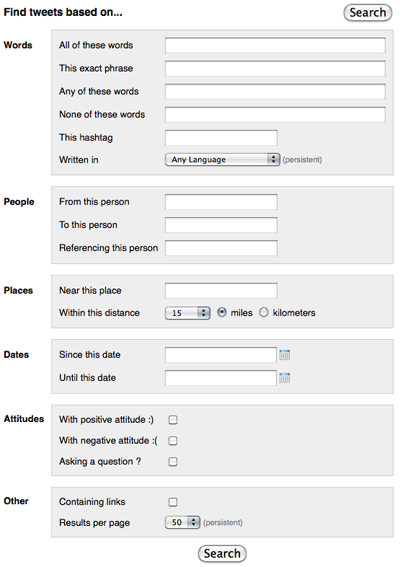
We talked about how to run simple searches on Twitter, and what search operators to use. But Twitter’s advanced search page makes it so much easier to find things of interest to you: keywords, brand names, movie titles, whatever people are talking about.
Seriously, this is an easy way to capture instant buzz. You can copy the RSS feed for the searches you create and perform most frequently. I routinely search for specific keywords within 50 to 100 miles of ZIP code 35203 (for Birmingham). In fact, I suggest ZIP codes for better precision. (If I looked for tweets within 50 miles of “Birmingham,” I’d have a lot of info about the cities in Michigan and England as well.)
You can hunt for sophisticated information, based on geography, or dates, or whether links are included. You can monitor your brand name, and your competitors’ brand names. You can even see the conversations your competitors are having, and vice versa.
Run the searches, and ease yourself into conversations. You’ll find it to be a remarkable tool for taking the pulse of the Twitterverse.
Follow @WadeOnTweets for more Twitter fun.
30 Twitter tips hath September


 Birmingham Blogging Academy